TL;DR:
When a voice agent fails, teams usually look at the transcript first. Often the problem isn't the transcript, it's the audio the transcript was built from.
Tyto, our audio insight model, scores every recording in a folder for six acoustic degradation dimensions, so you can find the calls your audio broke before a customer tells you.
Batch analysis is easy to run: point a script at your recordings, then review the results in a dedicated dashboard. Skip to How it works if you want the process without the background.
The problem: your agent's failures might not be your agent's fault
Audio is the most overlooked layer in the voice agent stack. Teams optimize the LLM, the ASR, the orchestration logic but rarely the audio itself. The problem is, without the right tooling, you can't see audio problems at scale. You only find out after a customer is already frustrated.
The most common causes of issues include background noise, a second voice or a TV/radio bleeding through, reverb and dropped packets from a bad connection. Each one causes a specific kind of downstream failure: ASR insertions, where the model hears words that were never said, turn-taking breaking down, the agent missing an instruction or even confidently answering the wrong thing.
The effect: lost calls, lost revenue, unhappy callers.
Today's basic workaround is manual call listening, or running an LLM-as-a-judge over the transcript. Both are still useful, and both are incomplete. Neither tells you anything about the audio itself, and neither scales to thousands of calls a week. This is the gap audio insight is meant to close: a category of tooling that gives you observability into the acoustic signal itself, scored on its own terms, independent of what was said.
Introducing Tyto for post-call analysis
Tyto is ai-coustics' audio insight model. It's lightweight, runs on the same audio your agent already receives and outputs a single risk score plus a breakdown of what's driving it. We covered the model itself in Introducing Tyto and Tyto 1.1 update, including how it works during a live call.
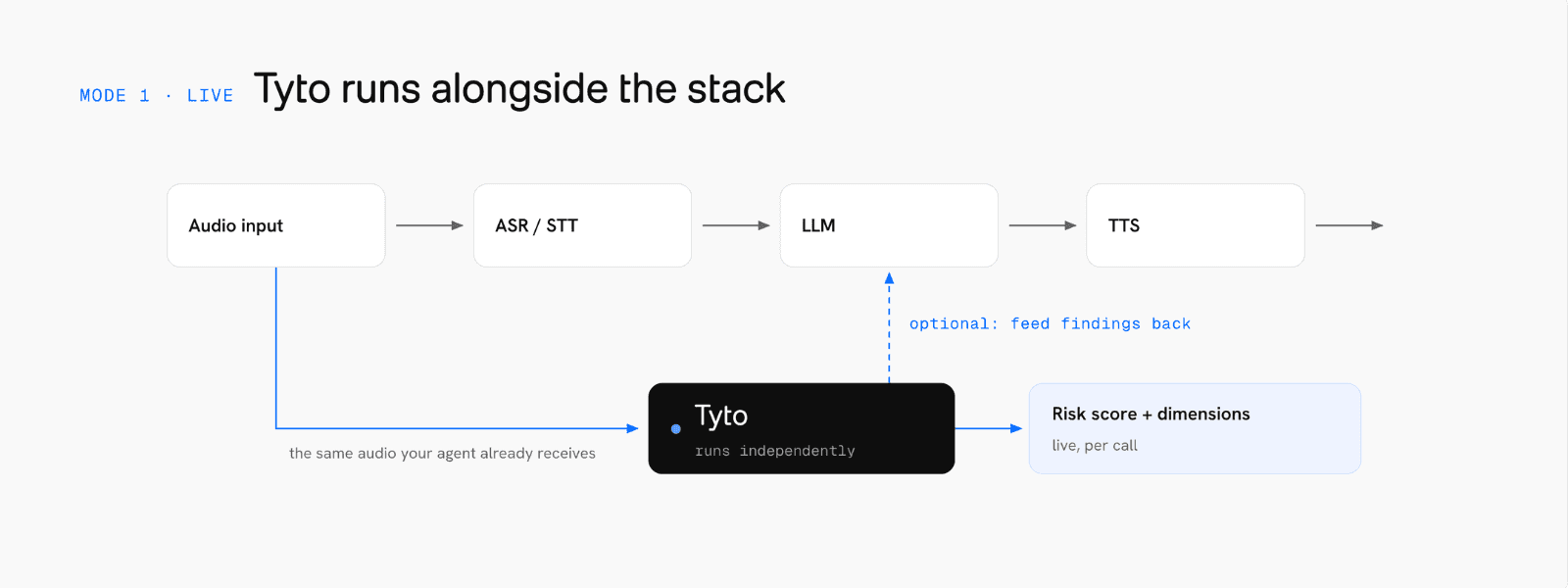
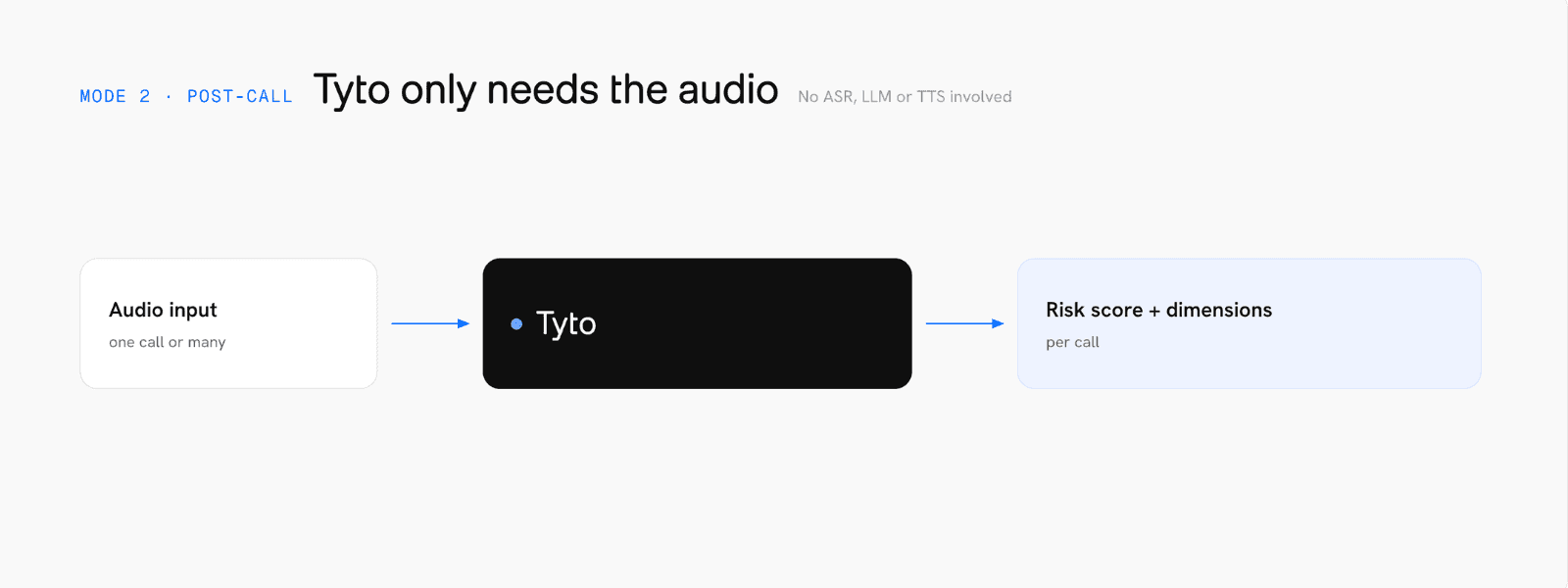
This post is about the other mode: post-call analysis, which you run in batch on a folder of recordings you already have. It's what you reach for once you have a backlog of calls and a hunch that some of them didn't go well.
Full information, not just sampling. Every recording in the folder gets scored, not just the handful someone had time to listen to.
Cause diagnosis instead of a simple alert. The driver dimension tells you why a call failed, not just that it failed.
Discovers patterns, catches outliers. Running a whole archive through Tyto surfaces the systemic issues and lets you act on them.
Catches problems before complaints do. You find degraded calls on your own schedule, not from a support ticket.
Once the initial backlog is cleared, the same script can run on a schedule or after every call to monitor the audio health and catch issues early.
How it works: running audio insight on your call archive
This is what audio observability looks like in practice: you don't need to touch your agent's code or your live pipeline for any of this, the whole process runs on recordings you already have, after the call is over.
At a high level:
Get an SDK license key. Sign up on the developer platform and generate one. It's self-service, no sales call required. You can also use it for free, no limits for 30 days.
Analyze a folder of call recordings. We publish a ready-to-run script in the docs that loads Tyto, scores every recording in the folder and writes the results to a single file. WAV, FLAC, MP3 and OGG are all supported, and multi-channel recordings are handled automatically. See the batch call analysis docs for the exact script and setup steps, that's also the page to check for the current model version and any parameter changes.
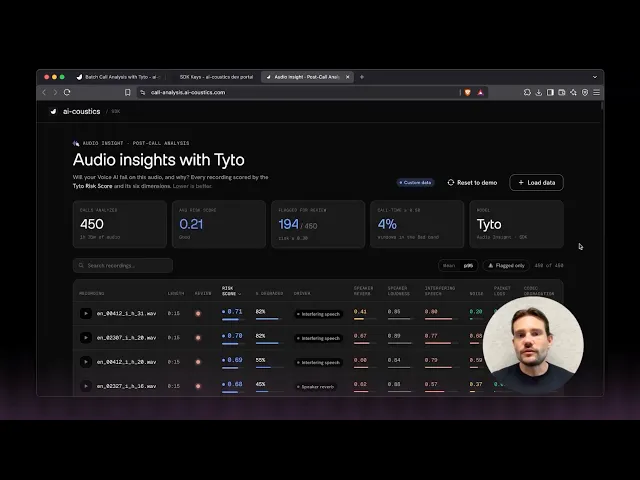
Upload the results to the call-analysis dashboard. The dashboard turns the raw scores into something you can triage: sort by risk, check a specific call frame by frame, listen back to the audio with more context and visually see audio-issue patterns.
Start from the top of the list. The calls with the highest risk score are the ones worth reviewing first.
If you'd rather not run a script at all, you can also upload a handful of recordings straight into the developer platform to try it manually first.
Understanding the score
Once the calls are in the dashboard, sort by risk score and start from the top.
Band | Risk score | Meaning |
|---|---|---|
Good | < 0.30 | Minimal degradation expected |
Warn | 0.30–0.50 | Noticeable degradation, elevated error rates likely |
Bad | > 0.50 | Severe degradation, downstream failure likely |
Risk score is one number, but it's built from six dimensions that make up Tyto's audio insight. In plain language:
Noise - unwanted ambient or environmental sound behind the speaker.
Speaker reverb - distance and room characteristics, near-field versus far-field.
Speaker loudness - a level meter rather than a degradation score, the one dimension that isn't judging the call, just measuring it.
Interfering speech - a second voice audible in the recording, whether that's someone else in the room or a TV or radio bleeding through.
Packet loss - dropouts from network and buffer issues or CPU overload.
Codec degradation - quality loss introduced by compression, new in Tyto 1.1.
These dimensions are near-orthogonal, meaning that they are largely uncorrelated. A call can be noise-free and still severely packet-lossy, so the risk score alone isn't enough to act on. That's why you need the context.
The dashboard surfaces triage labels on top of the raw scores: p95 per call, percent of the call spent degraded and a driver column showing which dimension contributed most. Tyto scores a call in short sliding windows rather than as one number, so p95 tells you how bad the call got during its worst moments, catching a rough 10-second patch that an average would otherwise smooth away.
What to do next: mapping the driver to a fix
Once you have the information about the type of acoustic challenges that your agent runs into, you can think of solutions. ai-coustics models are there to help with some of the dimensions.
High noise → Quail Multi Speaker. Our speech enhancement model, tuned for ASR accuracy to reduce WER.
High interfering speech → Quail Voice Focus. Isolates the primary speaker from background voices.
High reverb → flag for manual review, and consider mic guidance for users, or run it through Quail Multi Speaker.
High packet loss → not an audio-model problem. That's a network or infrastructure issue, flag it to that team instead.
Additionally, the dimensions can also affect your turn-taking. In that case, check your VAD. A noise or interfering-speech driver tells you why voice activity detection can be misfiring: triggering on background noise, or reacting to a voice that isn't the caller's. A dedicated VAD handles noisy input more reliably (like our VAD Multi Speaker), and a primary-speaker-conditioned VAD (like our VAD Voice Focus) goes a step further by ignoring other voices entirely.
A practical way to work through this: sort calls by risk score, review the worst ones first, then group them by driver. If the same dimension keeps showing up, noise on one specific queue, or reverb tied to one device model, that's a pattern worth fixing at the source.
Get started
Run Tyto batch analysis on your own call recordings: grab an SDK license key, then follow the batch call analysis docs for the script and setup. If you build something with it or have questions, our Discord is the fastest way to reach us.
FAQ
Why did my voice agent call fail?
There's rarely a single answer without looking at the audio itself. Run the recording through Tyto's batch analysis and check its risk score and driver dimension in the dashboard, that tells you whether the audio going into your agent was noisy or otherwise degraded. If the risk score comes back low, the audio was clean and the failure sits somewhere else in your stack, the LLM, the ASR or the orchestration logic. If it's high, you've found your answer, and the driver dimension points you toward a fix.
What causes voice agent audio quality issues?
Voice agent audio quality issues are most commonly caused by background noise, a second voice or media device audible in the recording. Any one of these can throw off VAD, ASR or turn-taking, even when your agent logic is working exactly as designed.
Does post-call audio analysis replace manual QA or an LLM-as-a-judge over the transcript?
No, and it's not meant to. Transcript review and LLM-as-a-judge tell you what was said and whether the response was right. Tyto's audio insight tells you whether the audio itself was at fault, before anything got transcribed. Most teams running Tyto in production keep their existing transcript-based QA and add audio insight on top of it, rather than replacing one with the other.
Do I need to change my voice agent's code to use Tyto for batch analysis?
No. Batch analysis runs on recordings you already have, after the call is over. There's no integration into your live pipeline required, you're pointing a script at a folder of files.
What's the difference between real-time and post-call audio insight?
Real-time Tyto scores audio as the call happens, so your agent or your infrastructure can react in the moment, for example by adjusting VAD sensitivity or asking the caller to move somewhere quieter. Post-call, covered in this guide, gives you observability across a whole archive of recordings after the fact, which is what you want for finding patterns across many calls rather than reacting within one.