Are you looking to improve your Voice AI performance by fixing the audio input? Trying to find the right noise cancellation model for your agent, or migrating from another provider? Curious about audio observability for your pipeline? Congratulations, you've already taken the first step: you know that bad audio causes errors downstream. You've landed in the right place. Here's a walkthrough of the ai-coustics models, so you can pick the right one for your pipeline.
The lineup
ai-coustics offers real-time audio tools purpose-built for Voice AI. What we mean by that is that our models are trained specifically to improve machine understanding of human speech while keeping speech intact for downstream STT, VAD, turn-taking and speech-to-speech systems.
We have three categories of models for Voice AI: speech enhancement, voice activity detection and audio insight. They are engineered specifically for real-time audio processing (read more about our own inference engine, AirTen) and most of them come in a variant for isolating one primary speaker and a general purpose one.
Speech enhancement → Quail Multi Speaker and Quail Voice Focus (tuned for machines); Rook Multi Speaker (tuned for humans)
Voice activity detection → VAD Multi Speaker and VAD Voice Focus
Audio insight → Tyto
What we do not do: STTs and any other parts of the agent core stack, turn-taking technology other than VADs and upload-based audio enhancement.
The rest of this post walks through each category and where it fits your pipeline.
Model approach: for humans vs. machines
Enhancing speech for a machine and enhancing speech for a person are different jobs, so we split them into two model families.
Quail models are tuned for machine listening (for example voice agents) and optimized for improving ASR/STT accuracy. It can intentionally leave a bit of residual noise in the output, since that acoustic context sometimes helps a downstream STT model rather than hurting it.
Rook models, on the other hand, are tuned for human listening - think conferencing, broadcasting, traditional calls. It prioritizes what sounds clean to a person.
If you're building a voice agent, you want Quail. In fact, the rest of our models, even outside speech enhancement, are designed with machine-to-machine communication in mind.
Quail | Rook | |
|---|---|---|
Available models | Quail MS, Quail VF | Rook MS |
Optimized for | Machine listening | Human listening |
Primary use case | Voice AI agents, STT/ASR accuracy | Voice calls, conferencing, broadcasting |
Sample rates | 8 kHz, 16 kHz | 8 kHz, 16 kHz, 48 kHz |
Sizes | L, S | L, S |
Speech enhancement: Multi Speaker vs. Voice Focus
Our Quail family models are designed for specialized use cases.
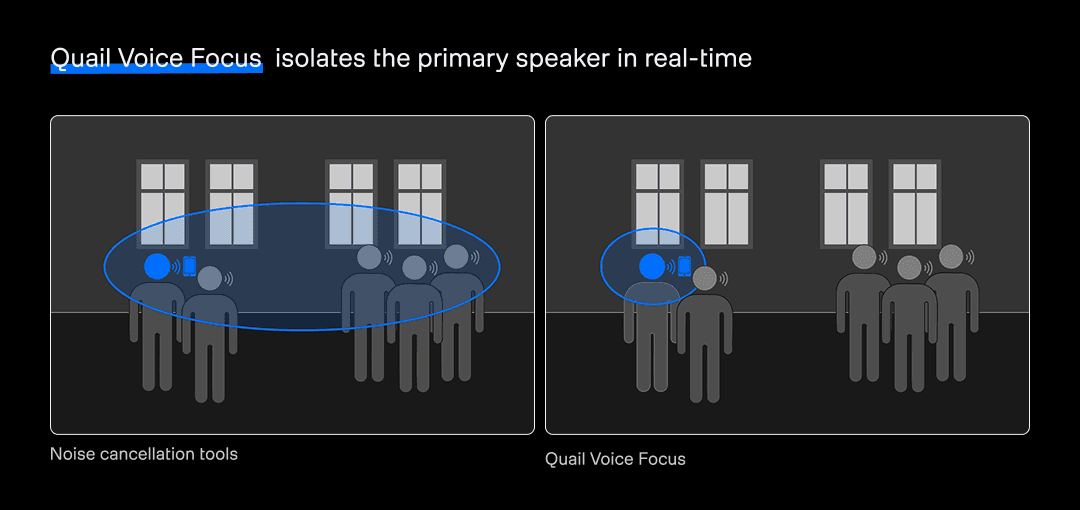
Quail Multi Speaker handles far-field and multi-speaker environments - speakerphones, meeting rooms, doctor-patient conversations, etc. It preserves speech from anyone in the room so it’s best used when you need more than one speaker in your final transcript.
Quail Voice Focus isolates one primary speaker. It’s most commonly used in voice agents (customer service, booking management or in-car voice assistants). It actively suppresses speech that sounds like it's coming from someone other than the primary speaker, which is what makes it the model we'd recommend for most voice agent pipelines.
Want to go deeper on Quail? Read more here and check out our benchmark numbers here.
Sizing: L vs. S
Our models come in different sizes - you've probably already noticed Quail comes in two. The difference is in accuracy and footprint. Importantly, sizing doesn't change latency: both share 30ms algorithmic delay.
L (Large) gives you higher accuracy. Reach for it when S isn't hitting the word error rate you need, and you have the compute budget for it.
S (Small) is lighter and faster, which makes it a good fit for high-volume deployments (100+ concurrent calls) and edge devices. It covers most voice agent pipelines well.
In numbers: L models are 20–35 MB depending on family, S models are roughly 5–9 MB. CPU usage scales with model complexity: Quail Voice Focus L uses noticeably more CPU than Quail Multi Speaker S, for example. See our performance guide and run the benchmark example on your target hardware to see exactly how many concurrent streams your setup can handle in real time.
Our rule of thumb: start with L for the best accuracy, and move down to S only if your compute budget or concurrency needs force the tradeoff.
Sample rates: matching the model to your pipeline
The SDK will auto-resample if you feed it audio at a rate the model doesn't natively support, but it's worth matching the model to your pipeline's native rate where you can:
Telephony / PSTN (e.g. Twilio µ-law, 8 kHz) →
quail-ms-s-8khzorquail-vf-2.2-s-16khz*WebRTC / voice agents (16 kHz or 48 kHz input) →
quail-vf-2.2-s-16khzHigh-fidelity calls / conferencing (48 kHz) →
rook-ms-l-48khzorrook-ms-s-48khz
Family | 8 kHz | 16 kHz | 48 kHz |
|---|---|---|---|
Quail Multi Speaker | ✓ | ✓ | — |
Quail Voice Focus | — | ✓ | — |
Rook Multi Speaker | ✓ | ✓ | ✓ |
That said - *Quail Voice Focus is only available at 16 kHz, and it's completely fine to use it even if your pipeline runs at 8 kHz. The tradeoff mirrors any lower-than-native input: the SDK spends some compute on frequency content your 8 kHz audio doesn't actually contain, though CPU usage is only marginally affected.
If you feed 48 kHz audio into a 16 kHz model, the SDK resamples internally and hands back output at your input rate, but the effective audio bandwidth is still 16 kHz. Resampling externally before the model and staying at 16 kHz afterward saves CPU with no quality loss.
Voice activity detection: VAD Multi Speaker vs. VAD Voice Focus
A Voice Activity Detector flags when speech is present in an audio stream. It’s the signal voice agents use for turn-taking, endpointing and deciding when to send audio downstream to STT. We currently offer two specialized VADs as part of the ai-coustics SDK.
VAD Multi Speaker (vad-ms-2.1-xxs-16khz) is general-purpose, it reacts to any speech in the room. We build it to fill the gap in the space for noise-robust VAD.
VAD Voice Focus (vad-vf-2.0-s-16khz) recognizes the primary speaker and only triggers on their speech. It tracks whichever speaker is currently dominant, dynamically, the same way Quail Voice Focus does for enhancement.
Property | VAD Multi Speaker | VAD Voice Focus |
|---|---|---|
Best for | All voices in the room | One target speaker only |
Model ID |
|
|
Size | 634 KB | 1.44 MB |
Sample rate | 16 kHz | 16 kHz |
Run VAD Multi Speaker alongside Quail Voice Focus, in parallel on the same input (not chained together), when you're in a noisy or multi-speaker environment and want dedicated voice activity detection to help your turn-taking on top of enhancement that directly helps with transcription accuracy.
You can chain a VAD after an enhancement processor instead of running them side by side, but we don't recommend it: the VAD ends up listening to audio that no longer matches what it was trained on, and the enhancement processor's delay stacks on top of the VAD's own prediction delay.
Audio insight: Tyto
Tyto is a different kind of model. Instead of enhancing audio, it evaluates it.
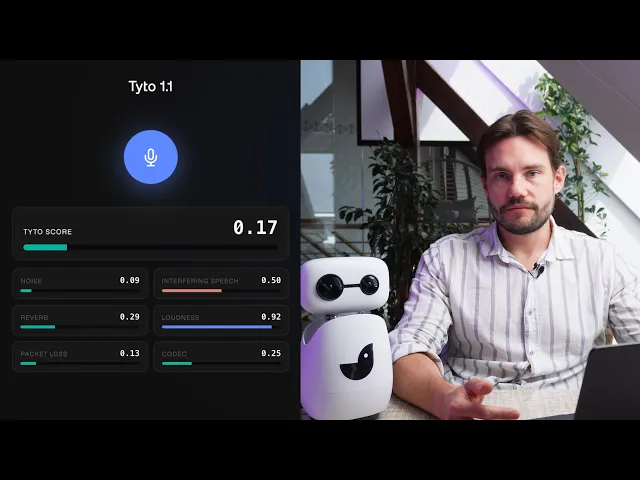
Tyto scores a recording or a live stream across six dimensions (background noise, reverberation, speaker loudness, interfering speech, packet loss and codec degradation) and rolls that into a single risk score. Without that kind of visibility, teams are usually blind to what's failing their voice agents until a customer complains. Read more about Tyto here.
It runs two ways. Real-time, during the call, so you can react to a problem as it happens. Or batch, against a folder of recordings you already have, so you can find the calls your audio broke without listening to all of them yourself. In practice, that might look like scoring every support call overnight and starting your morning with a ranked list of the ones most likely to have frustrated a customer.
How do you know if it’s for you? Try it on calls you already have and see how much visibility it gives you into the weak points of your setup.
Note on availability
Not every model is available everywhere yet. If you're integrating through a framework rather than the SDK directly, check which models that specific integration actually supports before you commit to a pipeline.
LiveKit has two separate plugins, and they're not interchangeable. For most applications, we recommend the official LiveKit plugin - it supports LiveKit Cloud and integrates more deeply with LiveKit's own tooling.
The official LiveKit plugin (
livekit-plugins-ai-cousticson PyPI, plus the Node equivalent) is owned and shipped by LiveKit. It bundles a fixed set of embedded models and pairs VAD together with enhancement. You can choose between three enhancement models:QUAIL_L(general-purpose, equivalent toquail-ms-l-16khz), andQUAIL_VF_L/QUAIL_VF_S(Voice Focus, large and small — equivalent to the olderquail-vf-2.1-*generation).The LiveKit plugin we maintain (
ai-coustics-livekit-pluginfor Python,@ai-coustics/livekit-pluginfor Node) includes thefull current lineup:quail-vf-2.2-l-16khzfor enhancement,vad-ms-2.1-xxs-16khz(VAD Multi Speaker) as a standalone component andtyto-1.1-l-16khzfor audio insight. Reach for it specifically when you need something the official plugin doesn't have yet; we have a migration guide for moving between the two.
Pipecat (pipecat-ai[aic]) covers Quail speech enhancement through AICFilter, plus a standalone VAD analyzer (AICQuailVADAnalyzer).
Whatever a framework integration doesn't support yet, every model in this post is available directly through the Python, Rust, Node.js, C++, C or WebAssembly SDK. All quickstart code snippets and integration instructions are in the docs.
Quick decision guide
Voice agent, one primary speaker → Quail Voice Focus for enhancement + VAD Voice Focus for turn-taking, run side by side.
Voice AI, multiple speakers to be transcribed → Quail Multi Speaker for enhancement; add VAD Multi Speaker for turn-taking if you're in a noisy environment.
Human-to-human calls or conferencing → Rook Multi Speaker, matched to your pipeline's sample rate:
rook-ms-s-48khzfor high-fidelity,rook-ms-s-16khzorrook-ms-s-8khzfor lower-bandwidth pipelines.Visibility into audio quality, live or after the fact → Tyto (
tyto-1.1-l-16khz), real-time during the call or batch over recordings you already have.
Where to go next
However you get there, the best way to know if a model's right for your pipeline is to hear it for yourself. For everything technical - model specs, code examples, quickstarts for every language and integration - head to the docs.
Want to try before you build? Spin up an SDK key and test models in the playground on our developer platform.